For South African container transporters

You are paying a meter you cannot see.

Software for your container jobs, trucks and drivers that shows each deadline before it costs you. Being built now — not live yet.

01 · The problem

The dates that cost you money

01

Demurrage

The container sits in the terminal past its last free day. The clock started when the vessel discharged, and nobody in the office watched it start.

02

Detention

The empty is still out. The clock started when the truck took the container out of the gate, and it runs until the empty is back at the right depot.

03

The wrong depot

The shipping line nominated a depot. The driver goes to a different one. The container comes back, the day is gone, and the charge lands anyway.

The container's two clocks. Demurrage runs from the vessel discharging to the last free day, and accrues after it. Detention runs from gate-out to the empty container's return, and accrues after it. DEMURRAGE Vessel discharges Last free day It starts costing DETENTION Out the gate, full Empty due back It starts costing
  • Demurrage

    Vessel discharges → last free day → it starts costing.

  • Detention

    Out the gate, full → empty due back → it starts costing.

The container’s two clocks. Both start at the terminal or the gate — not when your office notices.

A container has two clocks. An abnormal load has a permit that lapses, an export a stack that closes. All of it is knowable before it costs anything — a spreadsheet can hold the dates, it cannot watch them.

02 · What it does

What Cobren does

One record of each job, shared by the office, the phones and your client. Most of it is built and tested now; none of it is live yet, and each part below says where it stands.
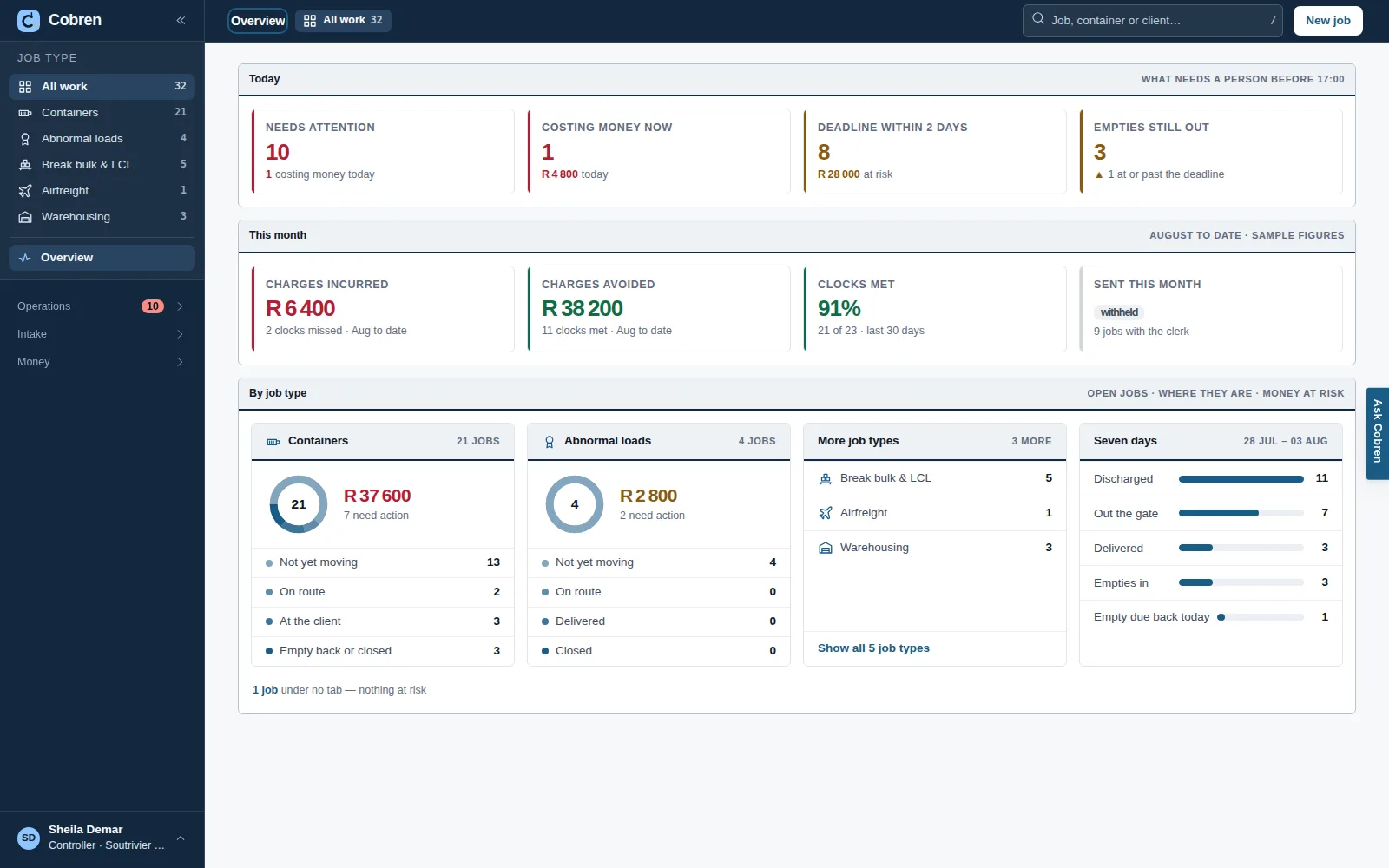
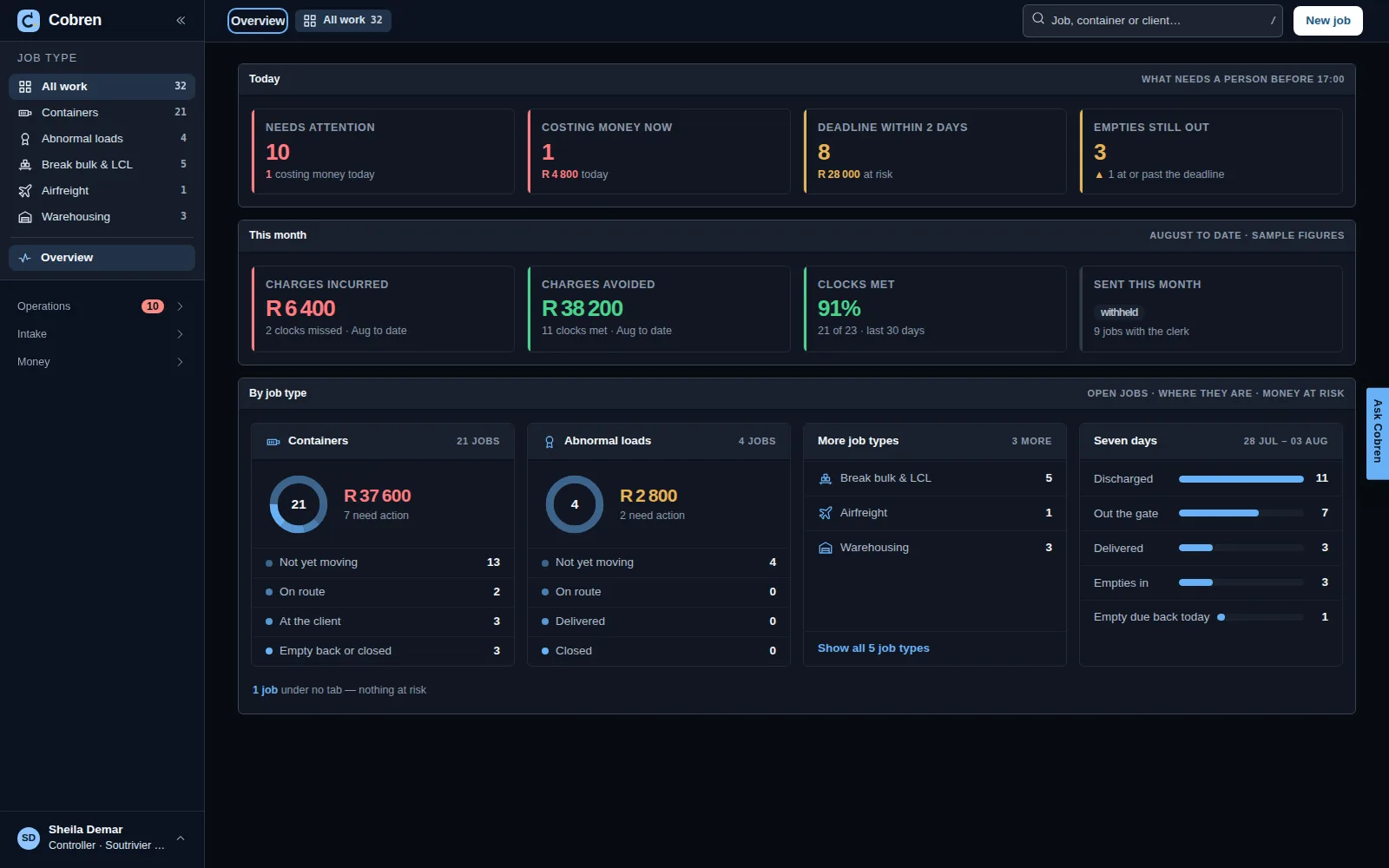
The Cobren overview: the money at risk today beside the list of jobs needing a decision, with panels for where the work sits and the last seven days. Prototype screen showing invented data. The Cobren overview in dark mode: the money at risk today beside the list of jobs needing a decision, with panels for where the work sits and the last seven days. Prototype screen showing invented data.
The owner’s first screen: the money at risk today and what needs a decision — not a list of jobs.

AThe office

The Board

Every open job, with the deadline that binds first in its own column and which deadline it is beside the date — a stack closing, a last free day, an empty due back. Sorted by what costs money soonest, and it says where a container is standing: at our yard, or on the ground at the client and for how many days. Built in the application and tested against a real database; not live yet.
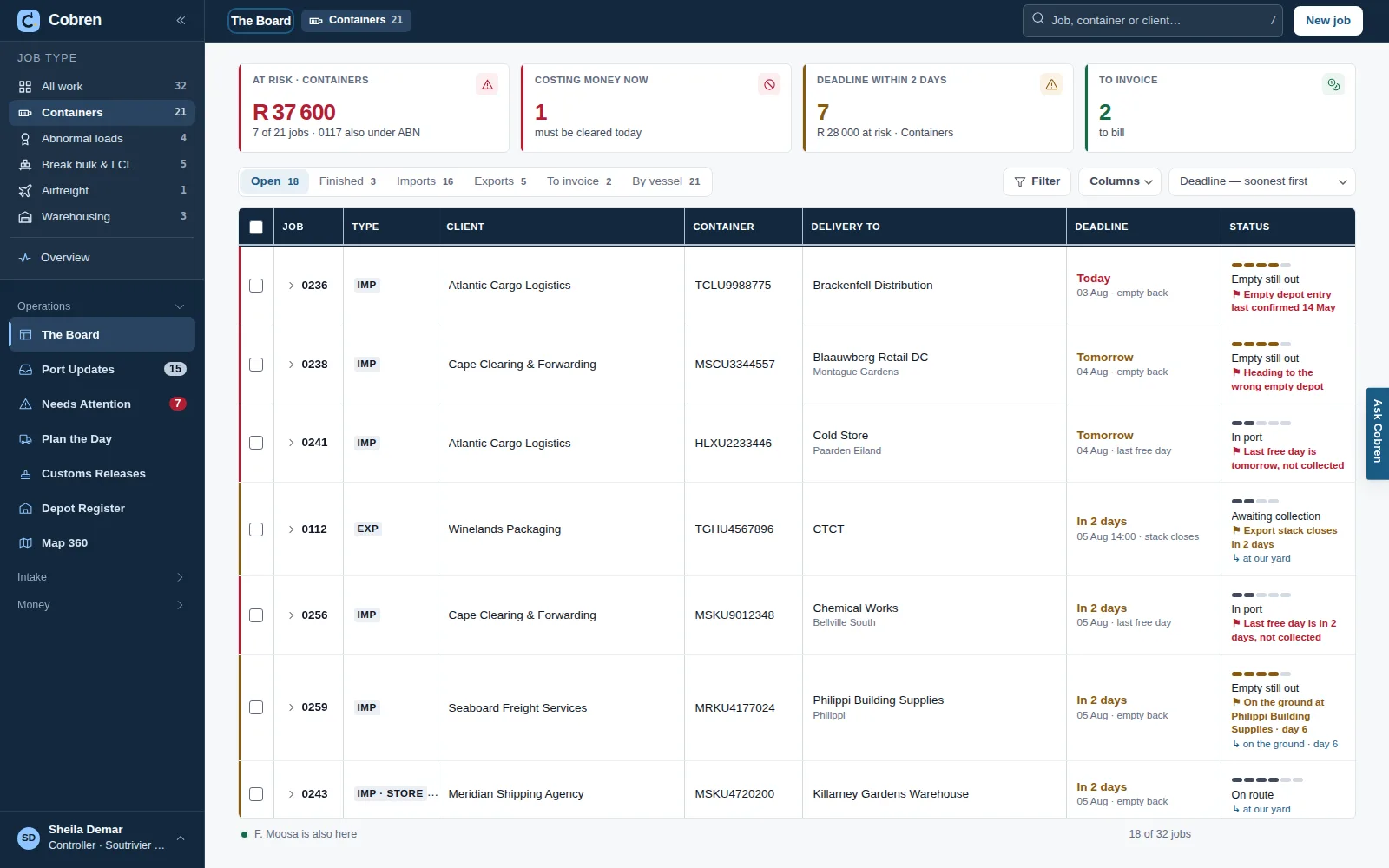
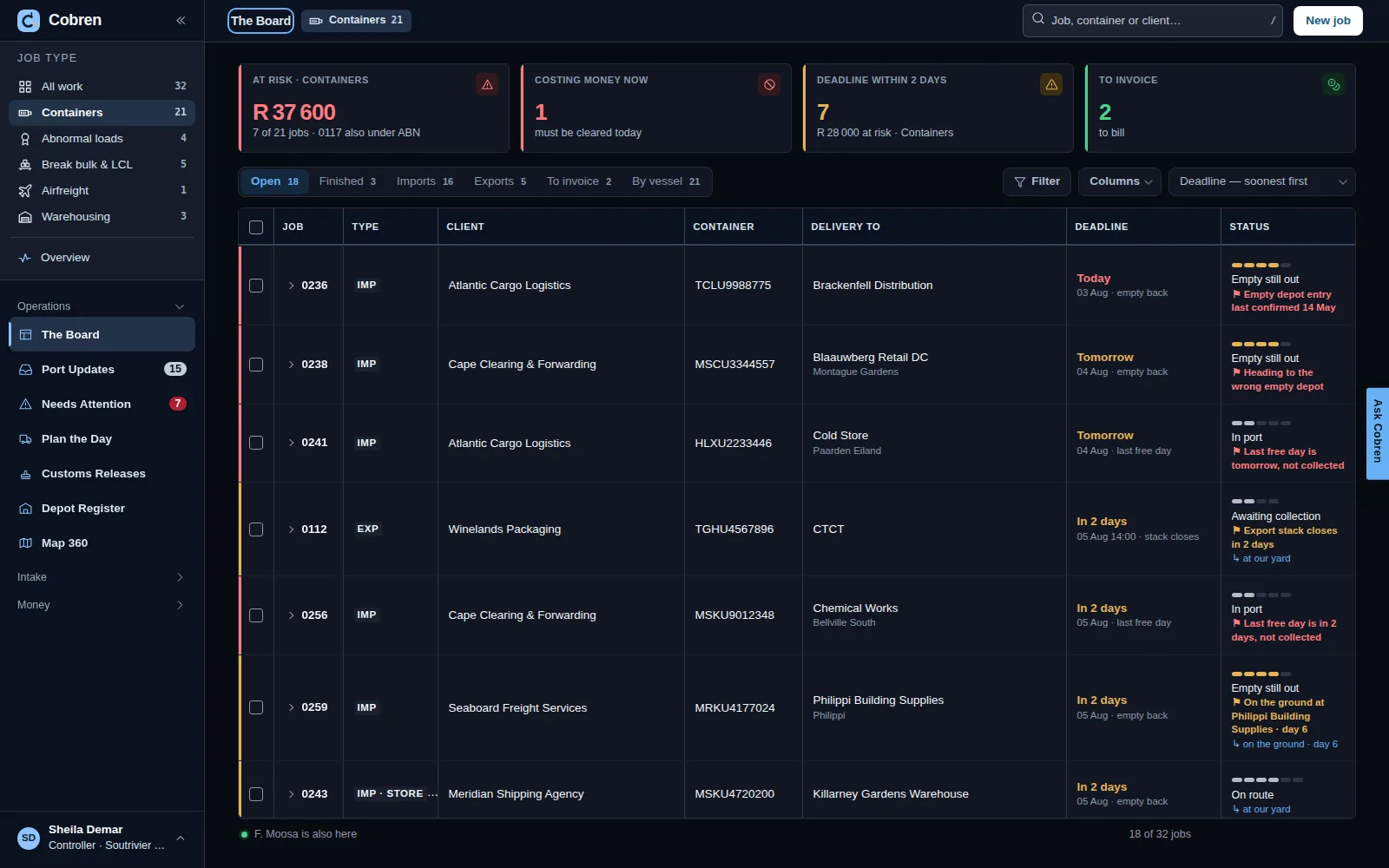
The Cobren board for container jobs: cards for money at risk, what is costing money now, deadlines within two days and what is ready to invoice; tabs for open and finished work, imports, exports, to invoice and by vessel; then a table of jobs with client, container, delivery place, the deadline that binds first and a status, some marked at our yard or on the ground at the client. Prototype screen showing invented data. The Cobren board for container jobs in dark mode: cards for money at risk, what is costing money now, deadlines within two days and what is ready to invoice; tabs for open and finished work, imports, exports, to invoice and by vessel; then a table of jobs with client, container, delivery place, the deadline that binds first and a status, some marked at our yard or on the ground at the client. Prototype screen showing invented data.

Port Updates: the port’s dates, read for you

Transnet publishes each container terminal’s lists — import storage, stack dates, berthing. Cobren reads the newest list for each terminal, one request at a time, keeps it exactly as published, and puts each change it makes to your jobs on Port Updates: the old date, the new one, what it does to the deadline, and where it came from. A person ticks and accepts; nothing changes a job by itself. What your controllers propose by hand, and what a client, depot or delivery site answers to a request you sent, wait in the same list. Built and tested against Transnet’s real lists; not live yet, so nothing has been collected.
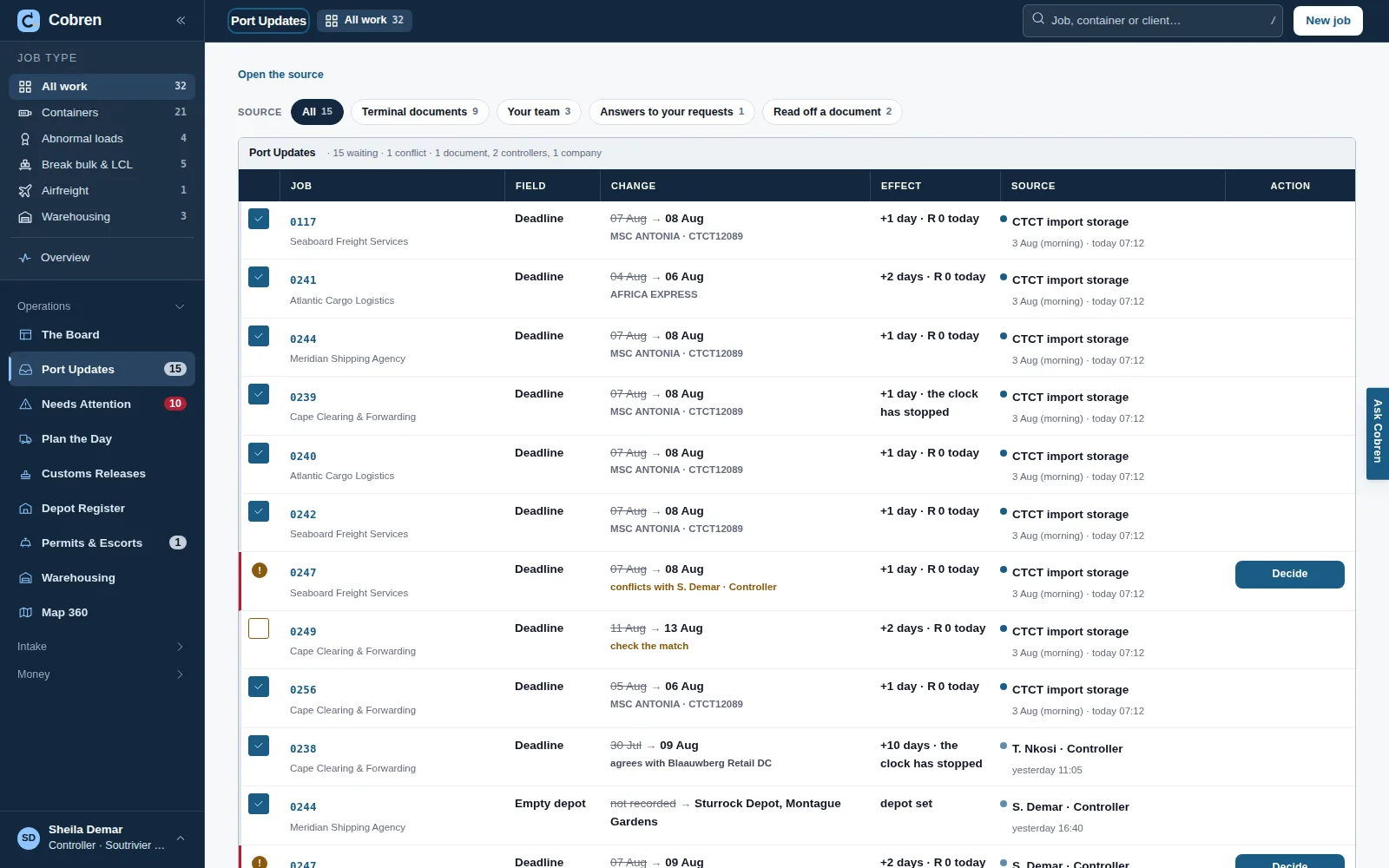
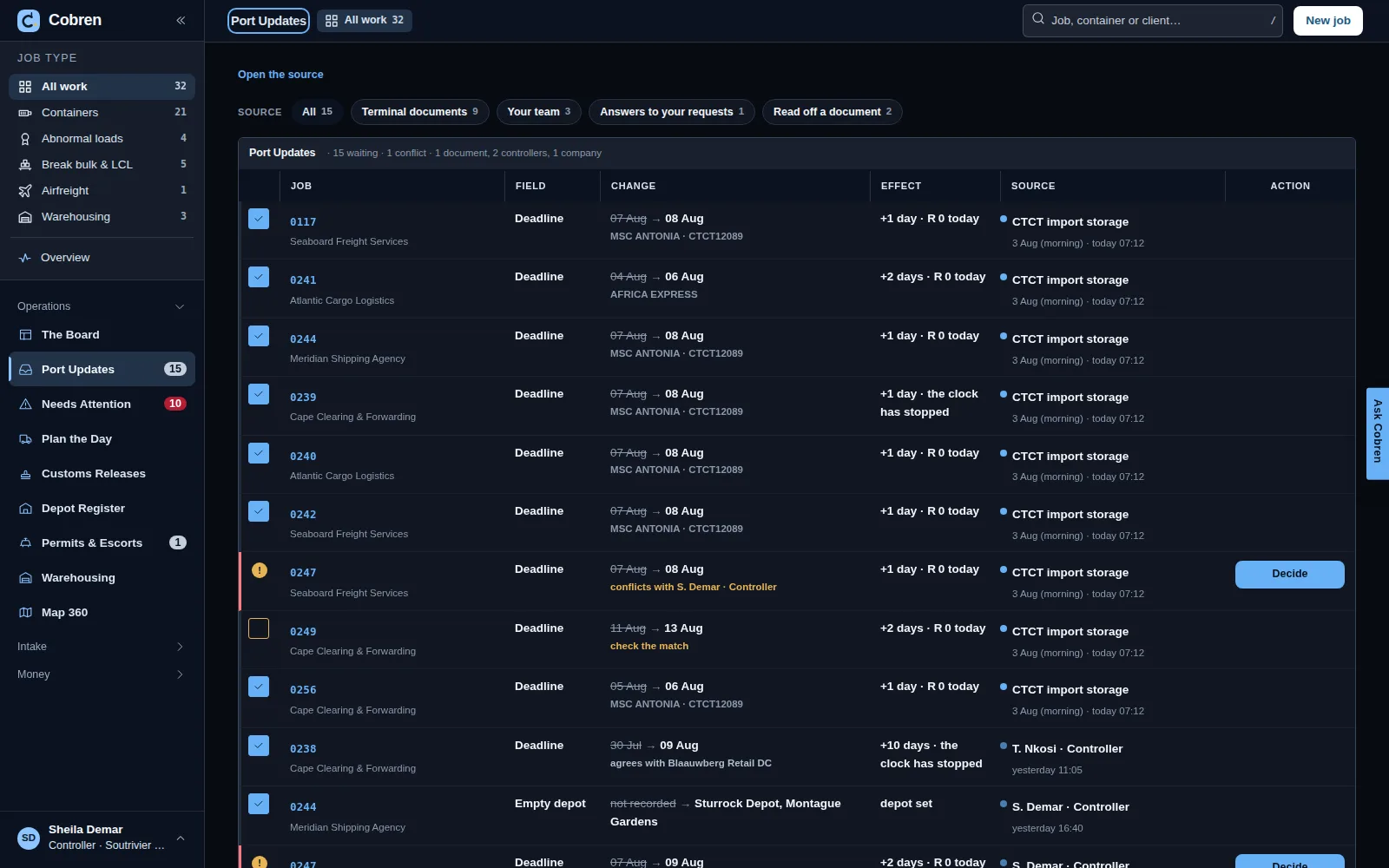
Port Updates in Cobren: sources to choose from — terminal documents, your team, answers to your requests, read off a document — then one list of proposed changes, each with its job and client, the field, the old date struck through beside the new one, what it does to the deadline, where it came from, a tick to accept it, and a Decide button where two sources disagree. Prototype screen showing invented data. Port Updates in Cobren, in dark mode: sources to choose from — terminal documents, your team, answers to your requests, read off a document — then one list of proposed changes, each with its job and client, the field, the old date struck through beside the new one, what it does to the deadline, where it came from, a tick to accept it, and a Decide button where two sources disagree. Prototype screen showing invented data.

A job is its stages

Port to your yard, into store for a few days, yard to the client, the empty back to the depot. The job type decides the stages: containers, abnormal loads, break bulk & LCL, airfreight or warehousing. Each stage has its own truck, driver and carrier — your own fleet on one, a subcontractor on another, on the same job. The previous stage’s truck is suggested, never forced. The status is worked out from the stages, not typed. Every change keeps who made it; a mistake is corrected or taken back, never rubbed out. Container jobs are built in the application and tested, not live yet; the other job types are drawn in the prototype, and abnormal loads and airfreight are Phase 2.
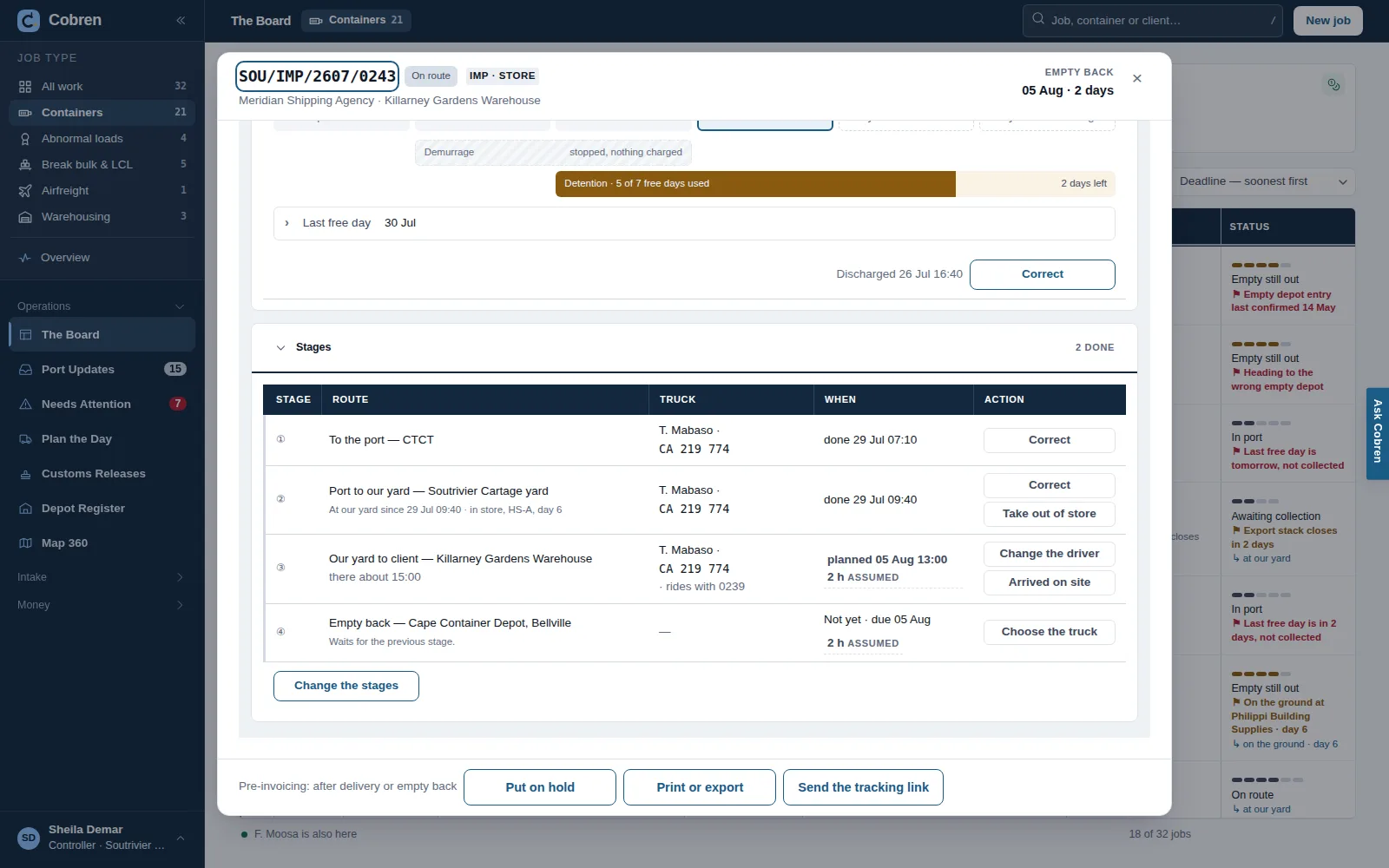
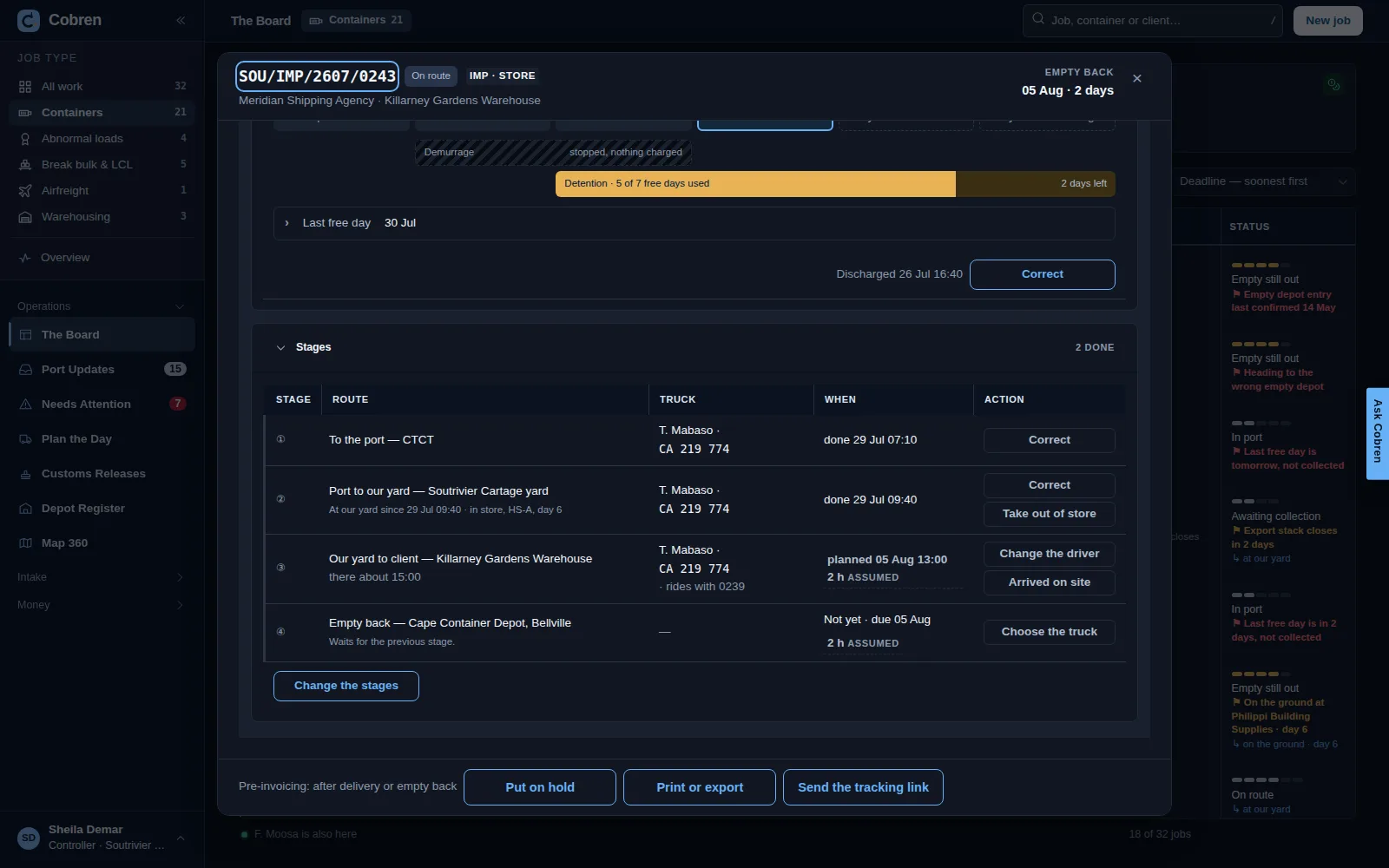
One import job open in Cobren, showing its Stages: to the port, port to our yard with the container in store there, our yard to the client, and the empty back to the depot — each with its truck and driver, when it was done or is planned, and an action. Prototype screen showing invented data. One import job open in Cobren, in dark mode, showing its Stages: to the port, port to our yard with the container in store there, our yard to the client, and the empty back to the depot — each with its truck and driver, when it was done or is planned, and an action. Prototype screen showing invented data.

Sidelifters and the ground drop

A place records what it can lift by itself — nothing, an empty, or a laden container. When a container is set down on the ground there, the job counts its days on the ground and the detention clock keeps running in plain view. Where the place cannot lift it, only a sidelifter may be put on the lift, and any other truck is refused by name. A sidelift fee sits on the rate card, per lift. Built in the application and tested; not live yet.
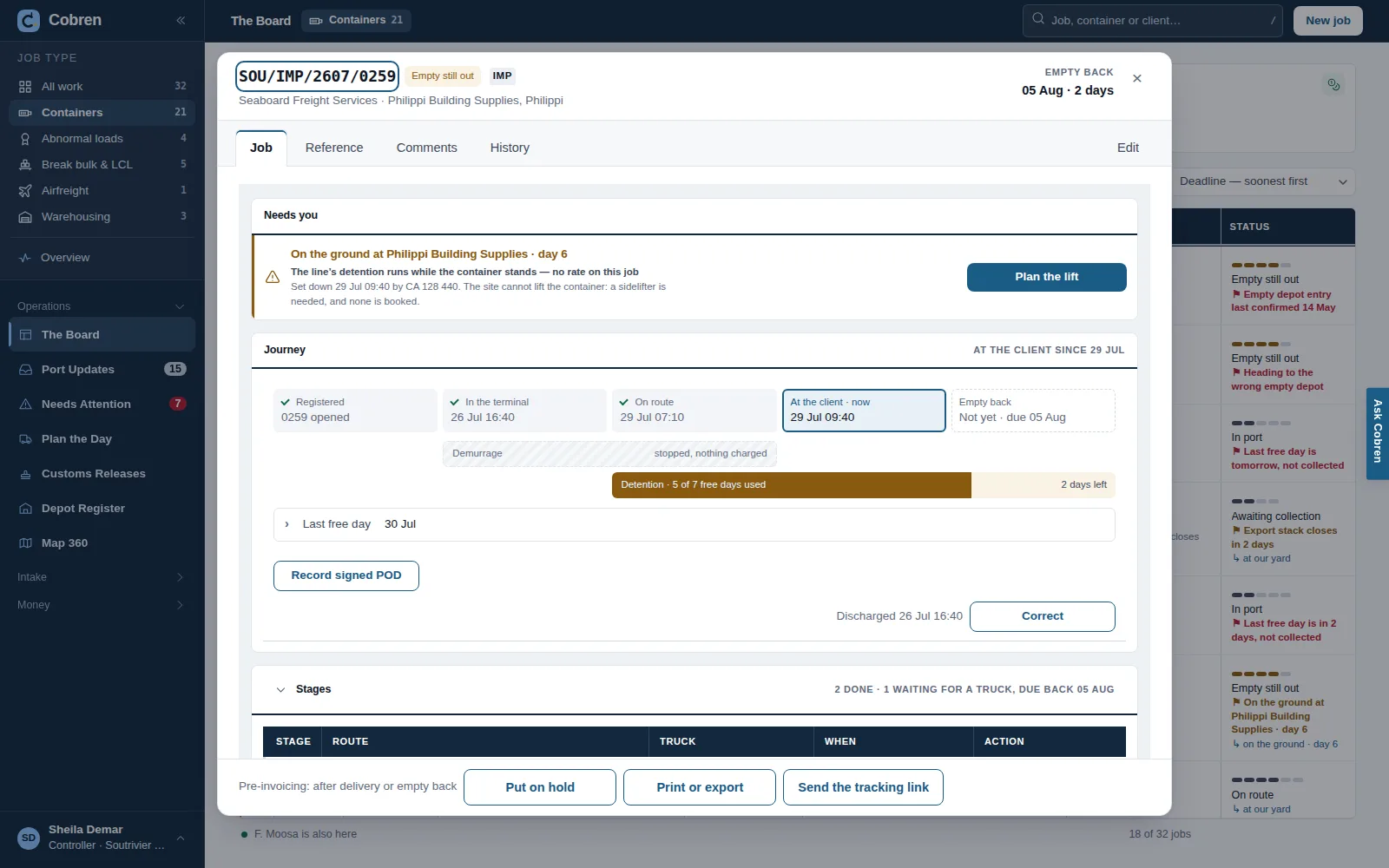
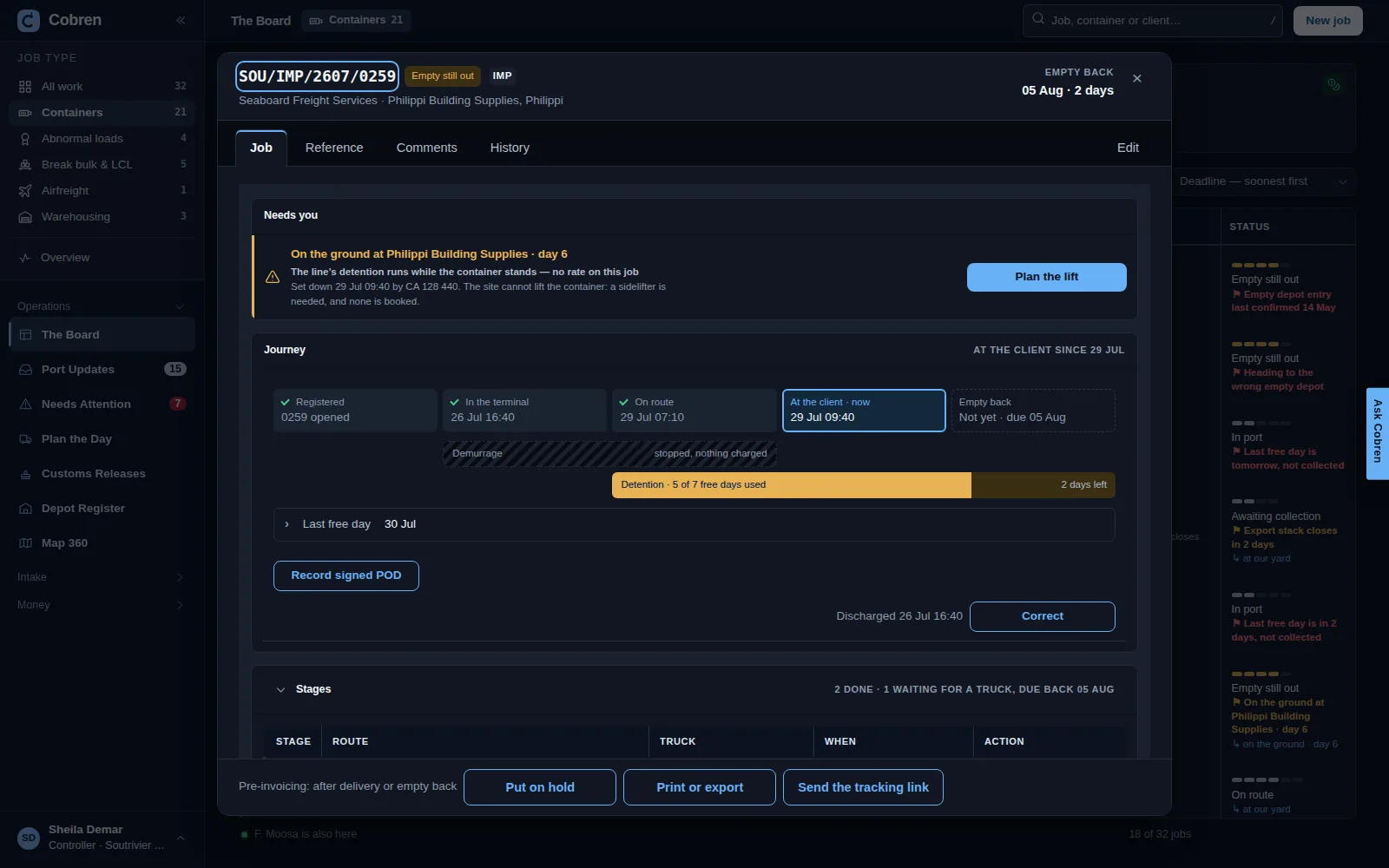
A job open in Cobren whose container is on the ground at a builder's yard: at the top, what needs you — on the ground, day six, nothing there lifts it so the lift needs a sidelifter and none is booked — with a button to plan the lift; below, the journey from the terminal to the client with the detention clock and the days left. Prototype screen showing invented data. A job open in Cobren, in dark mode, whose container is on the ground at a builder's yard: at the top, what needs you — on the ground, day six, nothing there lifts it so the lift needs a sidelifter and none is booked — with a button to plan the lift; below, the journey from the terminal to the client with the detention clock and the days left. Prototype screen showing invented data.

A job’s papers

The bill of lading, the arrival notification, the customs release, the signed delivery note: uploaded at the desk or photographed on a phone, kept with the job, shown to your client or held back, withdrawn when wrong, and printed. A photograph that is taken back stays in the history with why. Built in the application and tested; not live yet.

Storage and warehousing are jobs too

A job does not have to move. Goods or a container standing in your yard or your warehouse is a stay on a job: what is on hand, since when, and in which area. It is billed each month, or when it leaves. Warehousing shows everything standing; Warehousing to Bill shows what is owed, and a month that ended unbilled is flagged. Warehousing to Bill is built in the application and tested, not live yet; the Warehousing screen itself is in the prototype, on invented data — Phase 1.
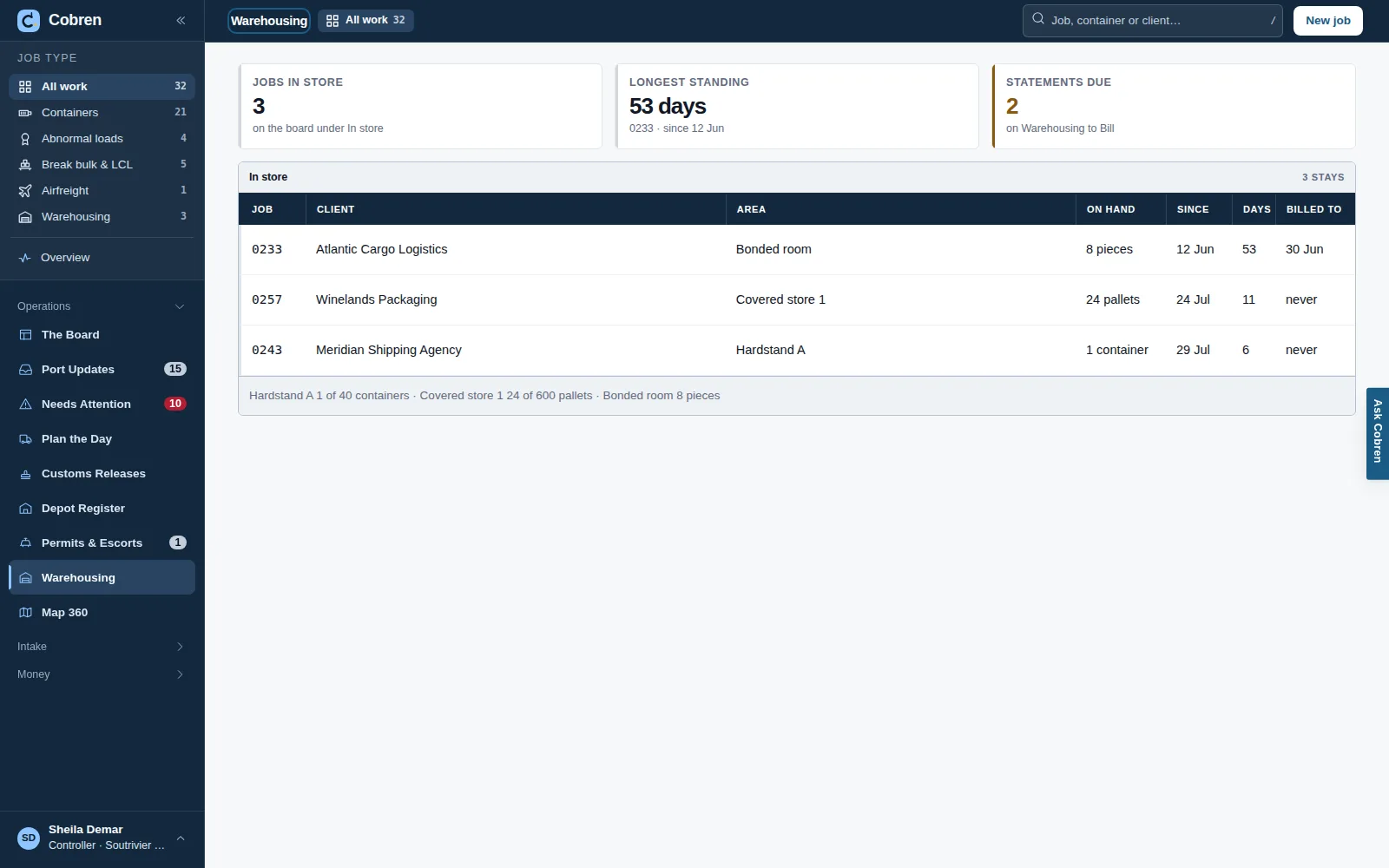
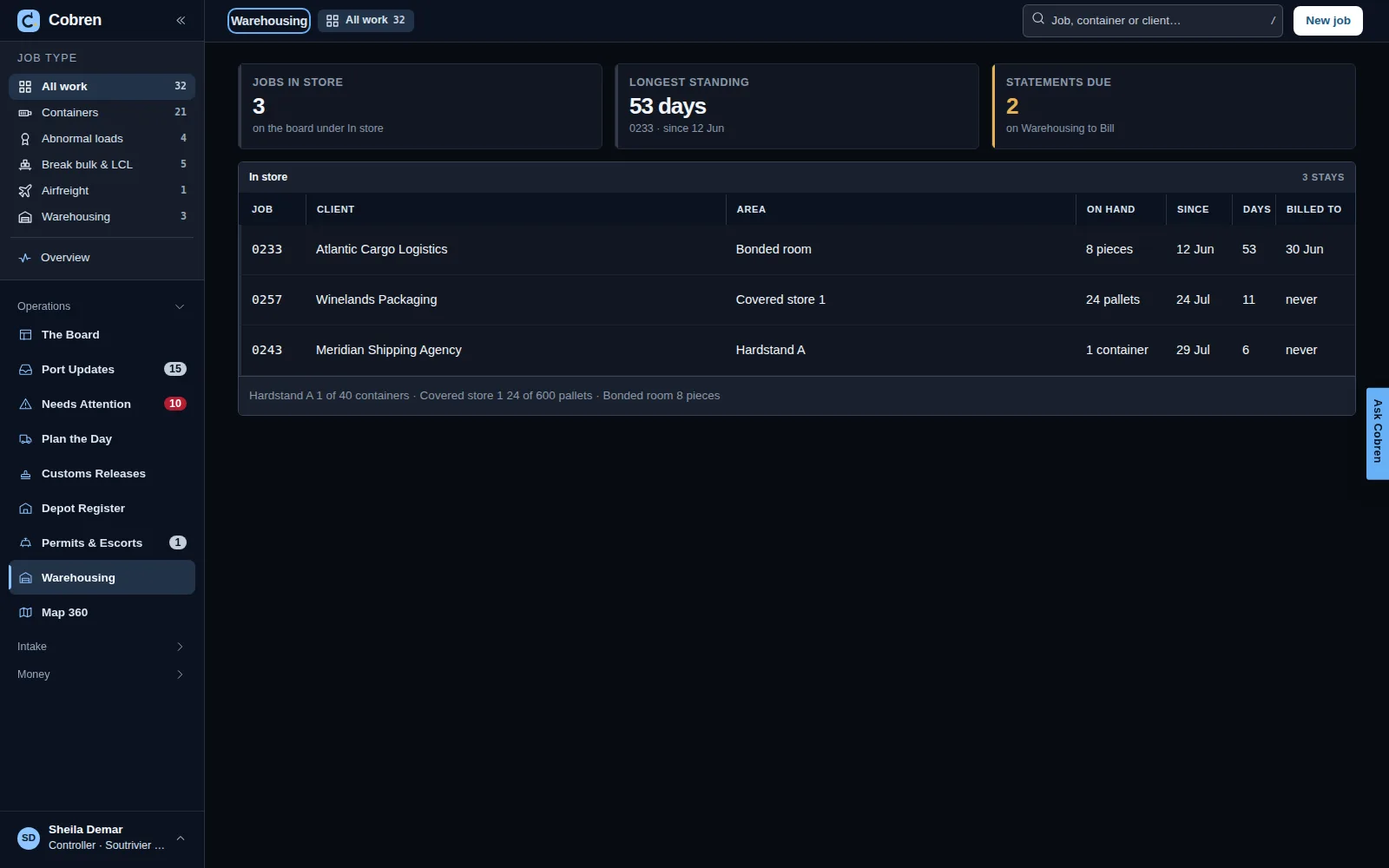
Warehousing in Cobren: cards for jobs in store, the longest standing and statements due, then a table of every stay with its job, client, area, what is on hand, since when, how many days and when it was last billed, and the space used in each area. Prototype screen showing invented data. Warehousing in Cobren, in dark mode: cards for jobs in store, the longest standing and statements due, then a table of every stay with its job, client, area, what is on hand, since when, how many days and when it was last billed, and the space used in each area. Prototype screen showing invented data.

BDrivers and phones

A phone for everyone on the road

One web page in the phone’s own browser: no app store, nothing to install, and updates arrive by themselves. It needs Android 10 or newer with the current Chrome, or an iPhone on iOS 16 or newer. Built in the application and tested; not live yet.

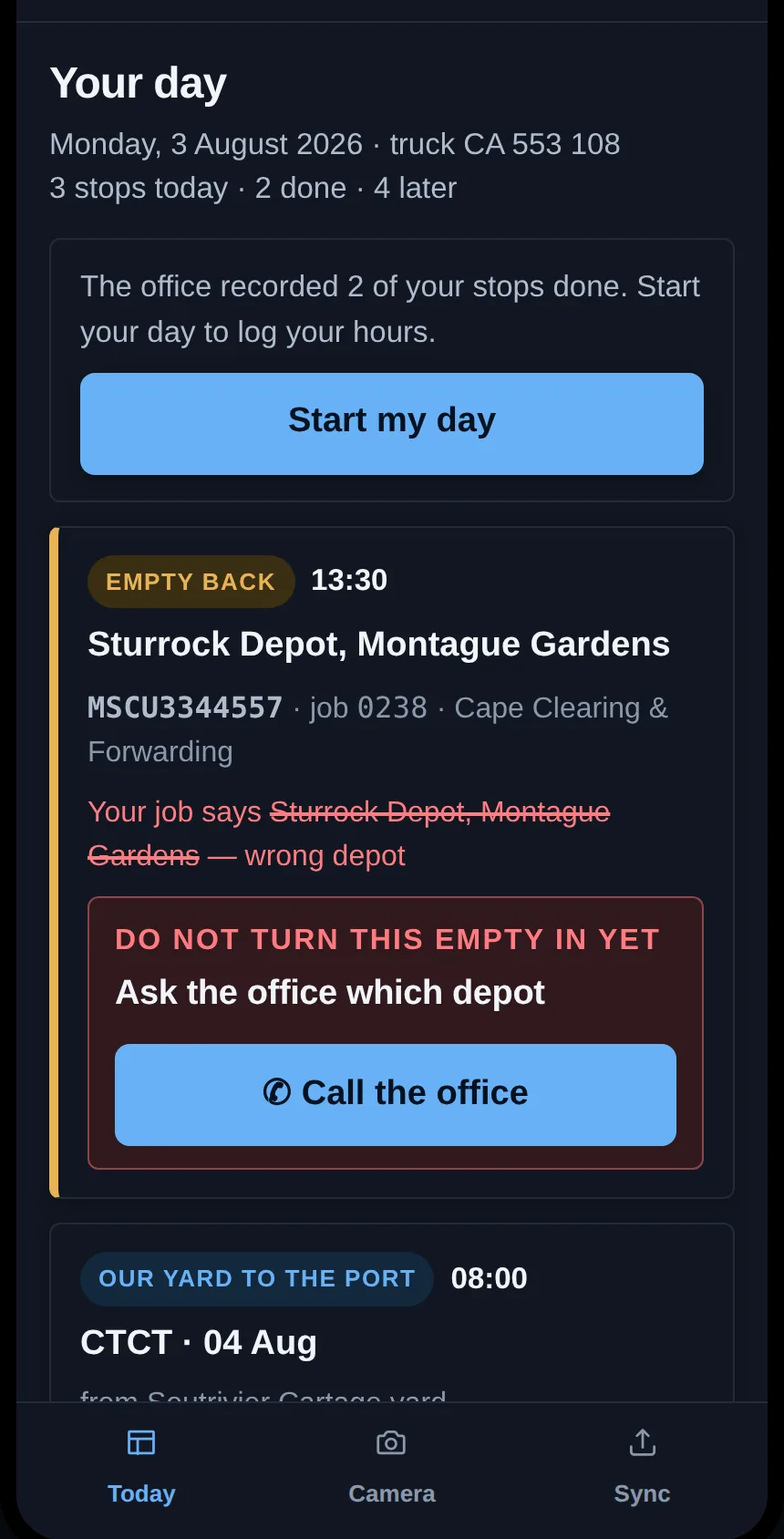
  • Your drivers, and a subcontractor’s drivers on the link your office sends them: the day’s stops in order — open, arrive, the evidence, leave. A photograph is asked for only where it is evidence: the gate’s paper, the signed delivery note, where a container was left on the ground. If the driver is heading for a different depot from the one on the job, the card says stop before the empty is turned in.
  • Your controllers: their jobs, and a paper photographed straight onto a job, or into a new one.
  • You, the owner: the business today, in a few figures.
  • No signal? Everything recorded and every photograph waits on the phone, and goes when the signal is back.

Which phones it works on, and how to put it on the home screen
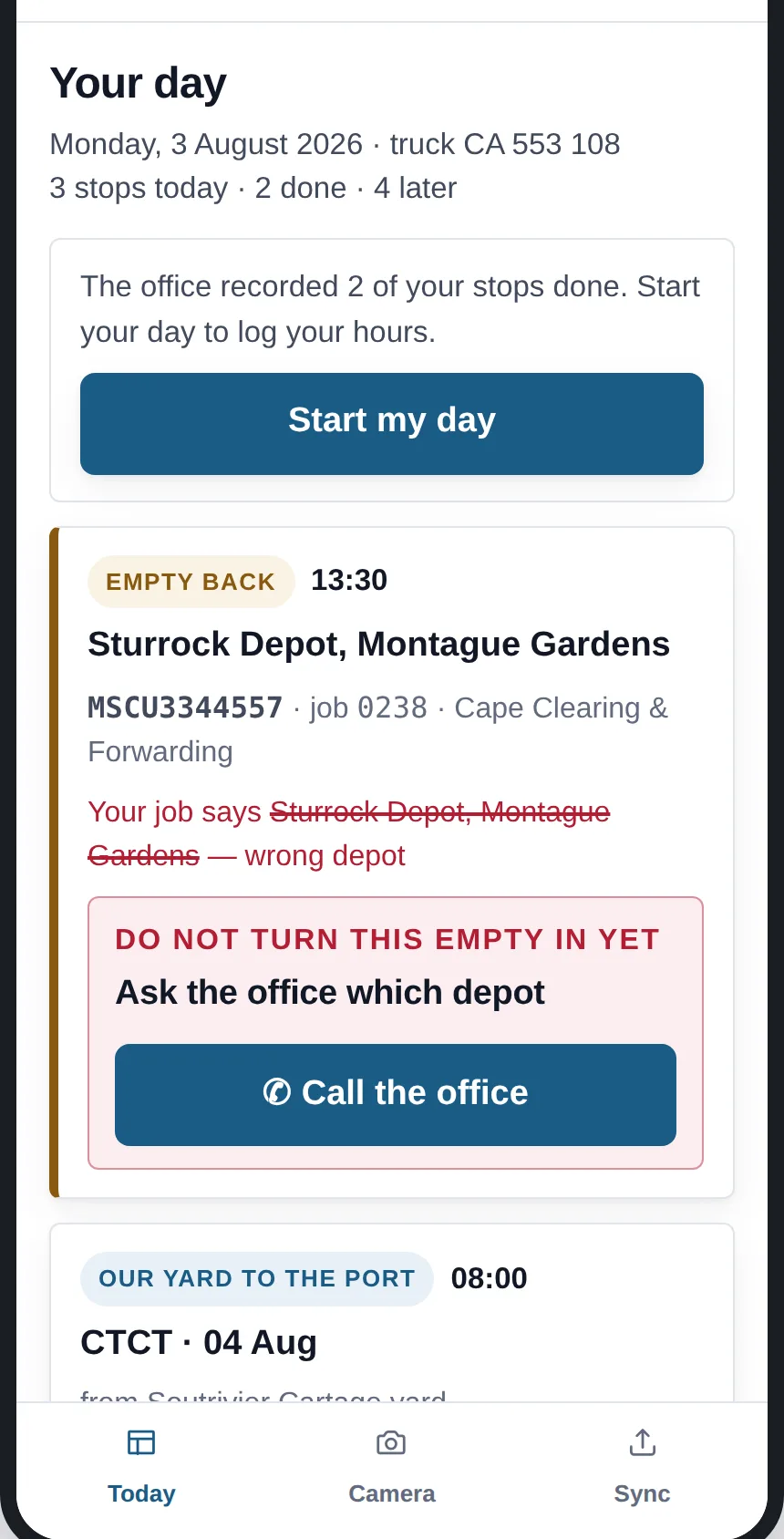
The driver's phone in Cobren: Your day, with the truck and the stops for today, a button to start the day, and the stops in order — a turn-in of an empty with a stop for the wrong depot, a hand-in of an export at the terminal, a collection. Prototype screen showing invented data. The driver's phone in Cobren, in dark mode: Your day, with the truck and the stops for today, a button to start the day, and the stops in order — a turn-in of an empty with a stop for the wrong depot, a hand-in of an export at the terminal, a collection. Prototype screen showing invented data.

Plan the Day

The day’s stages still needing a truck, next to your fleet. A person does the allocating; the suggested truck for every stage can be taken in one press. It refuses a clash and names it — and anyone who can allocate may overrule it, with the override recorded against their name. The screen is in the prototype — Phase 1; putting a truck and a driver on a stage is built in the application, not live yet.
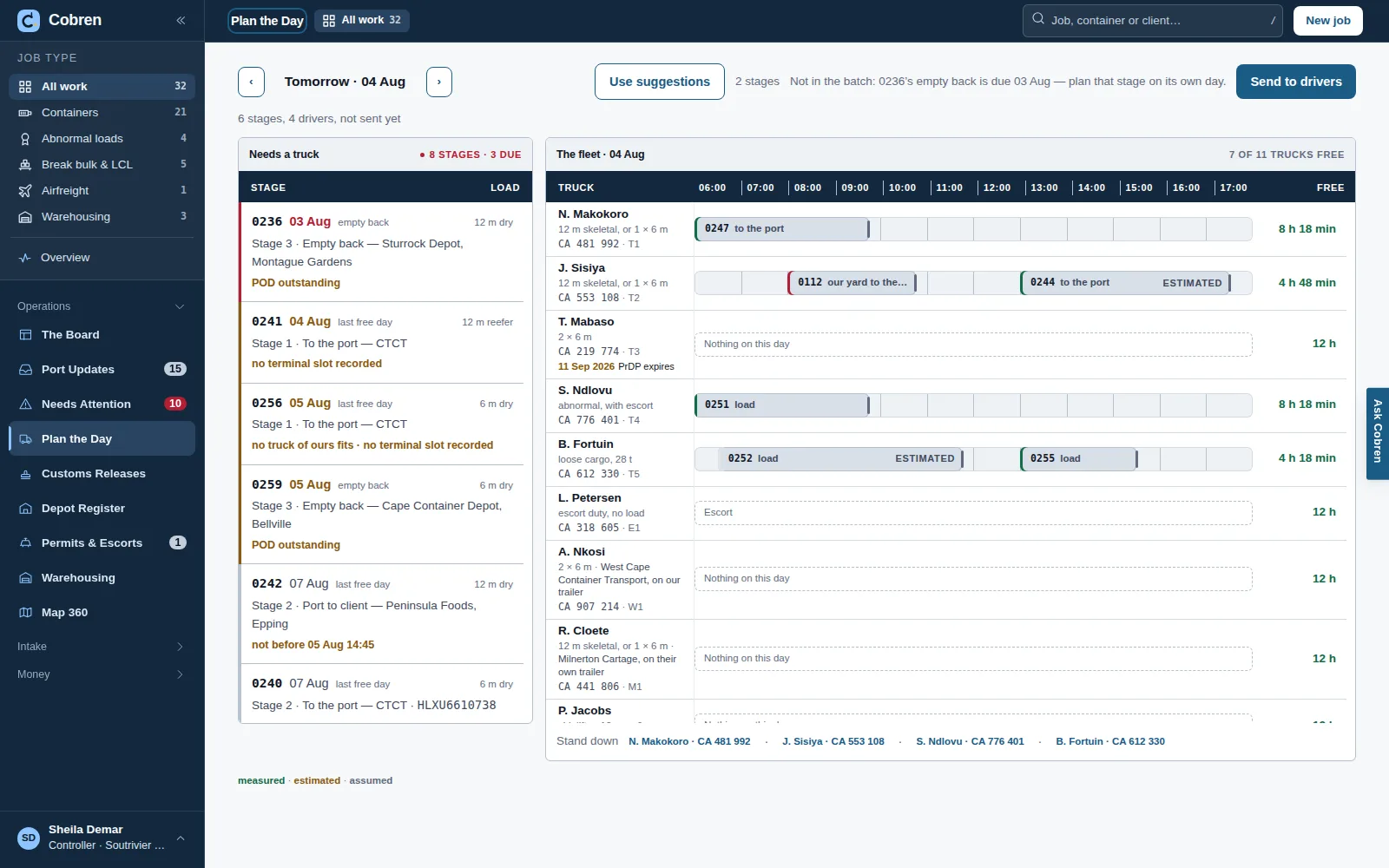
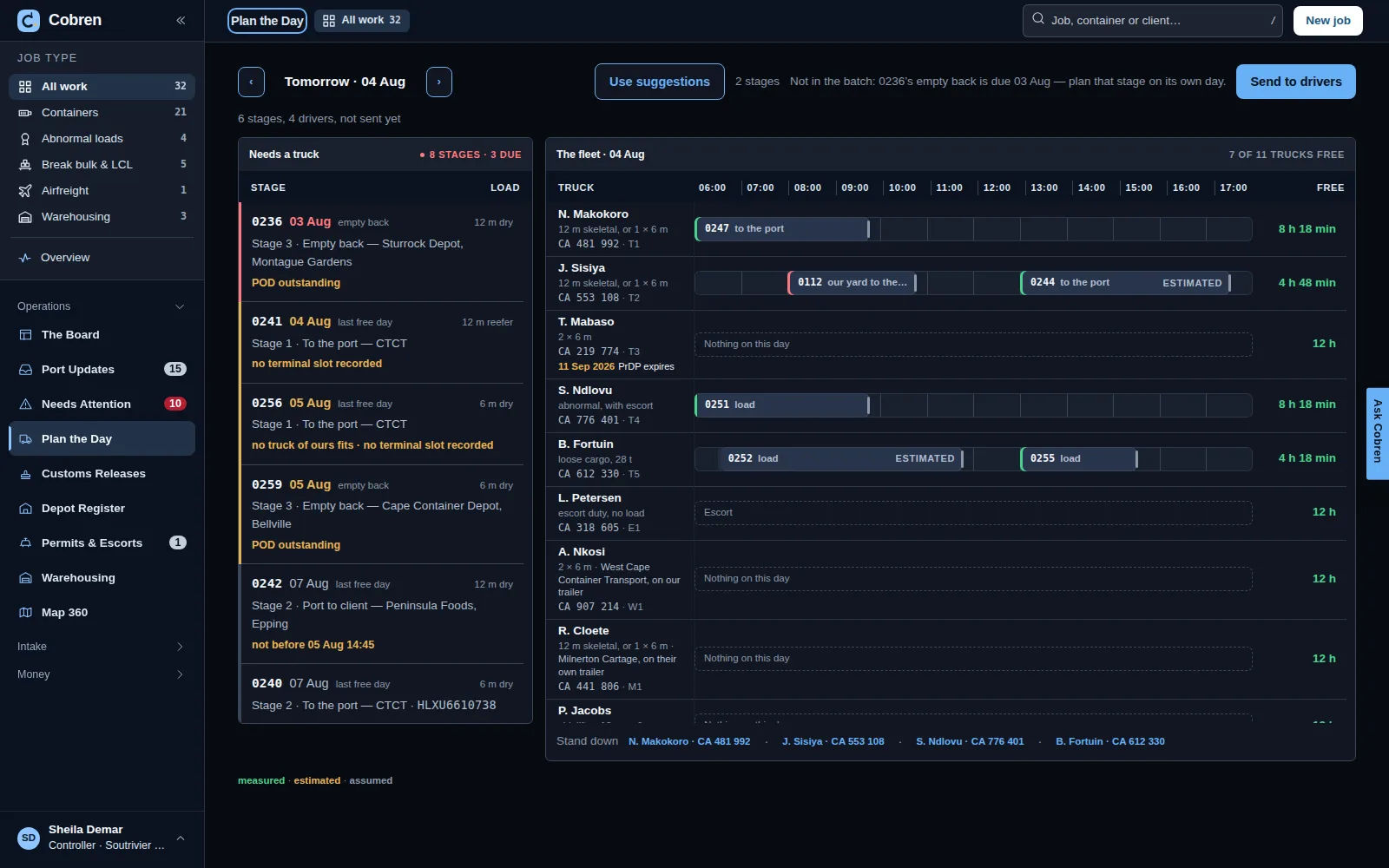
Plan the Day in Cobren: stages still needing a truck beside a per-driver timeline of the fleet, with assumed time windows marked as such. Prototype screen showing invented data. Plan the Day in Cobren, in dark mode: stages still needing a truck beside a per-driver timeline of the fleet, with assumed time windows marked as such. Prototype screen showing invented data.

Driver Overview

One driver of yours, or one subcontractor, over a week or a month: the stages done, the hours off the daily log, and each load confirmation beside what the subcontractor claimed. A difference is named, with the amount, and is settled one item at a time — the period is reconciled when nothing is left open. In the prototype, on invented data — Phase 1.
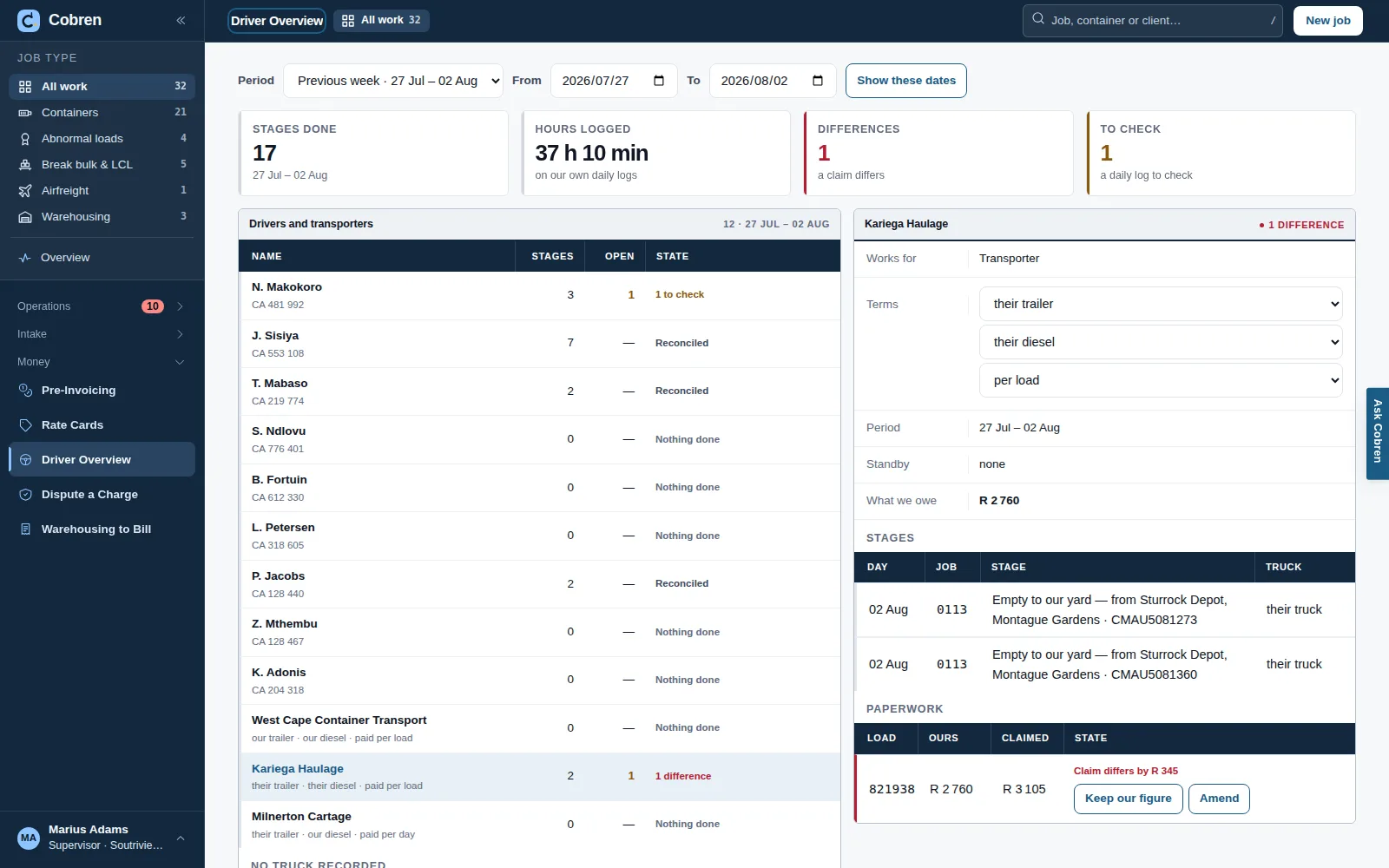
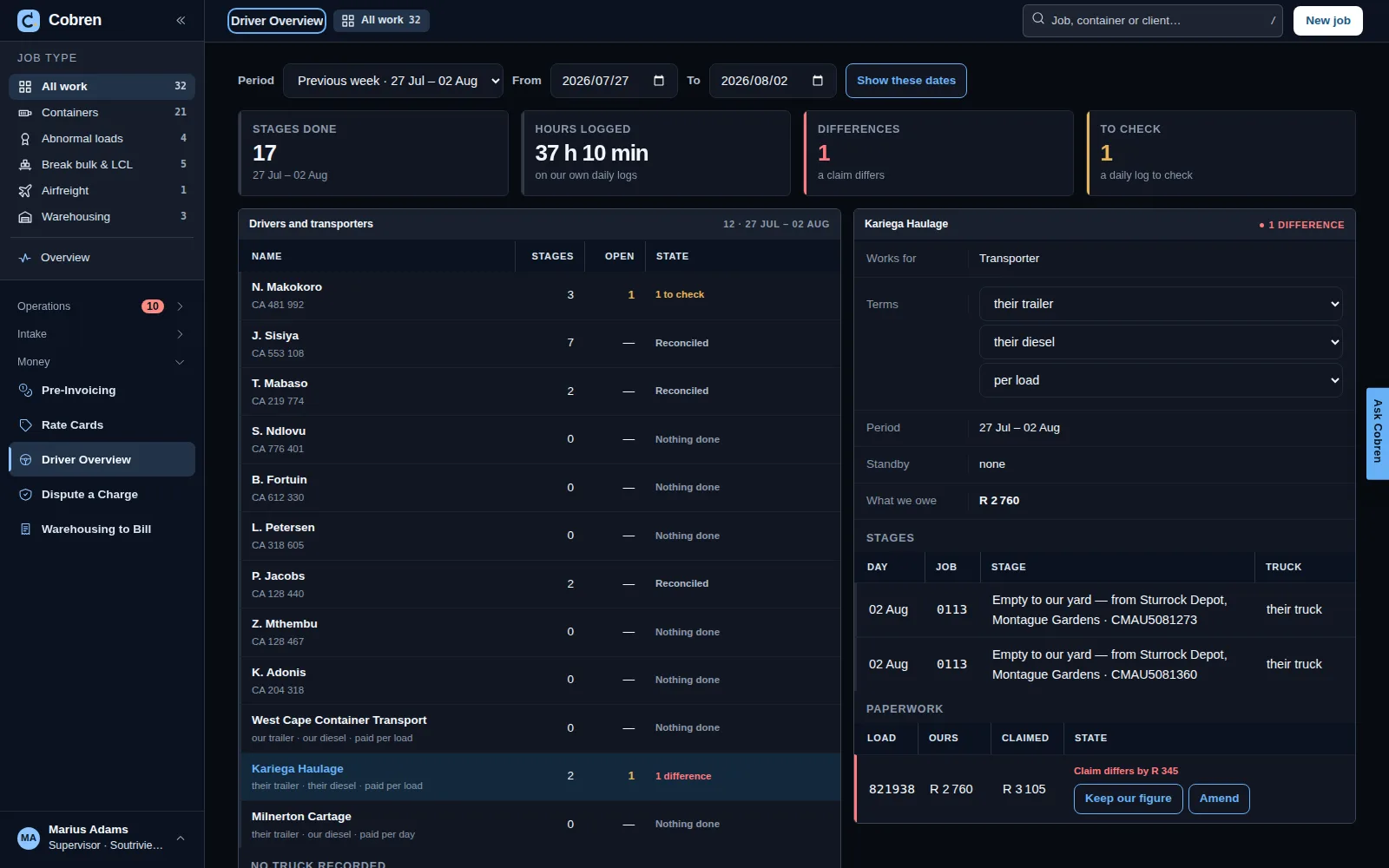
Driver Overview in Cobren for one week: cards for stages done, hours logged, differences and items to check; a list of own drivers and subcontractors with their stages and state — reconciled, to check, a difference; and one subcontractor opened, with their terms, the stages they did and a load confirmation whose claimed amount differs from ours. Prototype screen showing invented data. Driver Overview in Cobren, in dark mode, for one week: cards for stages done, hours logged, differences and items to check; a list of own drivers and subcontractors with their stages and state — reconciled, to check, a difference; and one subcontractor opened, with their terms, the stages they did and a load confirmation whose claimed amount differs from ours. Prototype screen showing invented data.

CThe money

From the rate card to the pre-invoice

The client’s own rate card prices the job, or your company’s card where the client has no line. The job may agree a different price, and says which card line it came from; someone other than the person who priced it approves it. Pre-Invoicing is one queue of the jobs ready to bill, with what still needs deciding and whether the POD is signed, and VAT is worked out once, on the total. Once the pre-invoice goes to your invoicing clerk the price is frozen, and a correction is a credit note. Built in the application and tested against a real database; not live yet.

Going out, a subcontractor gets a load confirmation. It asks about their goods-in-transit cover before it is issued, and when their invoice comes in it is matched against ours, with any difference named and the amount beside it. Built in the application and tested; not live yet.
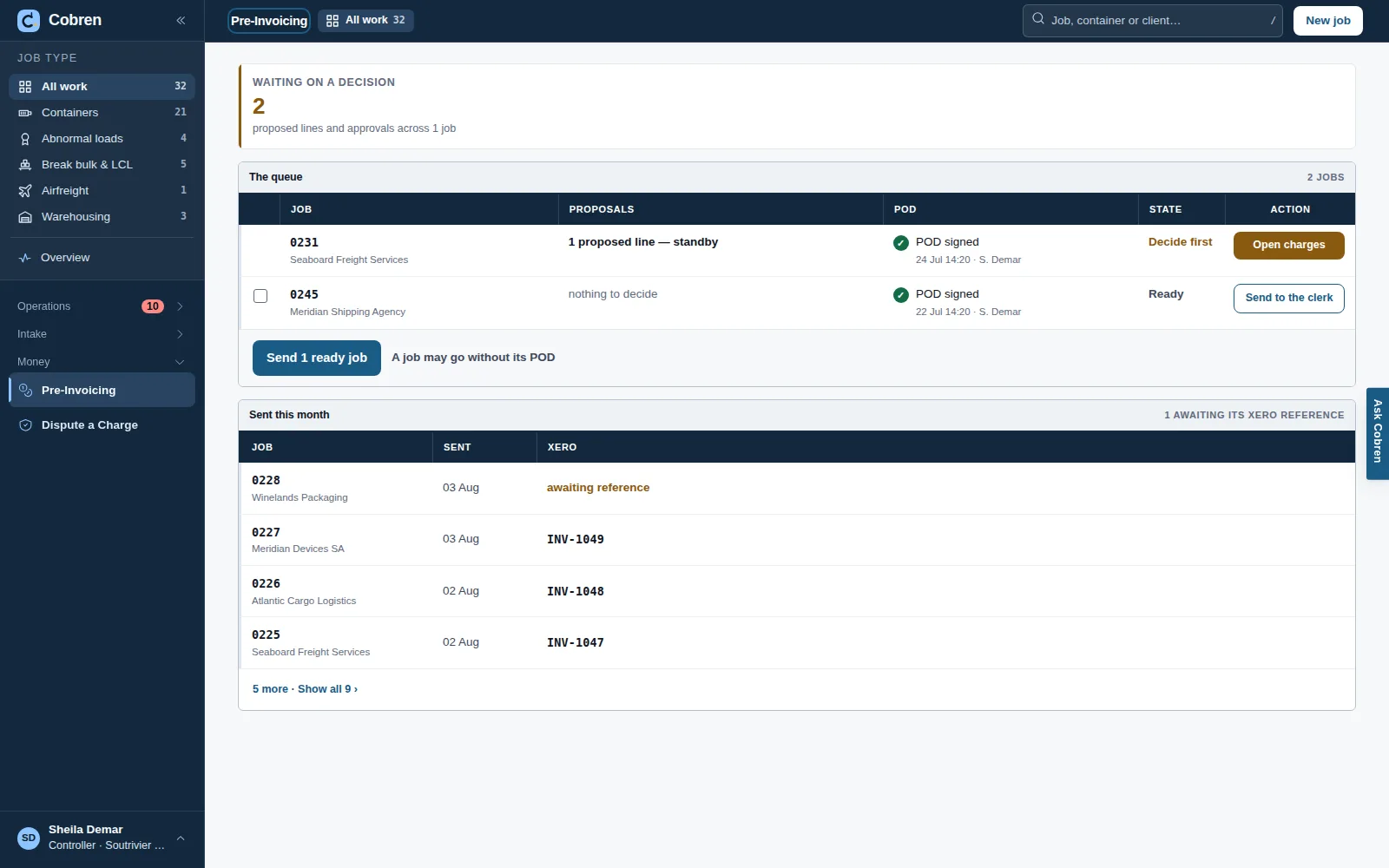
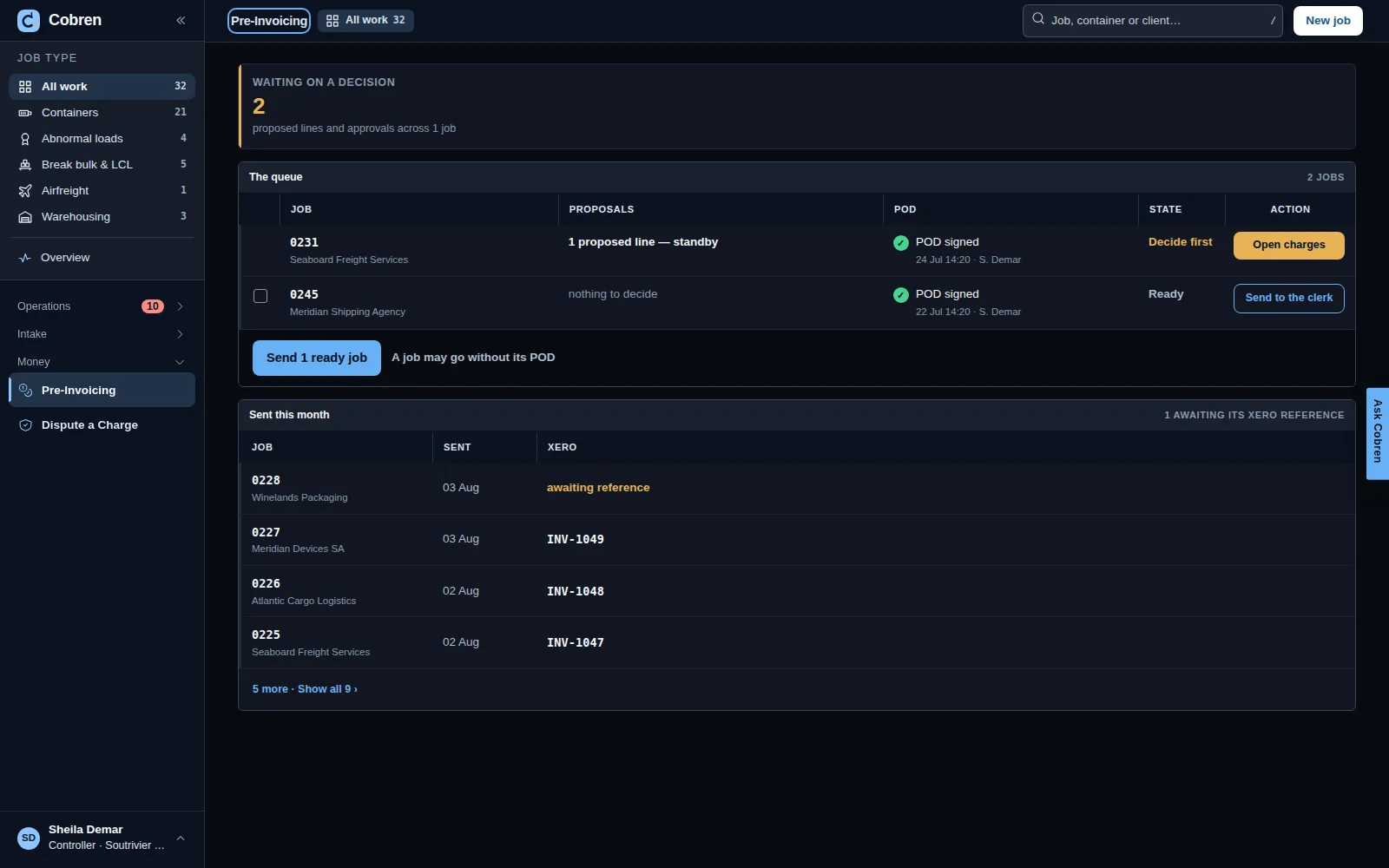
Pre-invoicing in Cobren: cards for ready to invoice, held back, waiting on a decision and sent this month, then one queue of the jobs ready to bill with client, amount, what is still to decide, whether the POD is signed, state and one action per row. Prototype screen showing invented data. Pre-invoicing in Cobren, in dark mode: cards for ready to invoice, held back, waiting on a decision and sent this month, then one queue of the jobs ready to bill with client, amount, what is still to decide, whether the POD is signed, state and one action per row. Prototype screen showing invented data.

DYour client

A tracking link, a request link and a portal

Like a courier’s: the office sends a job’s link to the people it chooses, by e-mail or WhatsApp, and only on a channel that person agreed to. The link shows that one job — its stages in plain words, the papers released to the client, and messages both ways — and needs no account. A client can send you a new job from a request link; it waits in External Requests until the office takes it on. A client you invite gets a portal of their own jobs and papers, signed into with Google or a password. Every e-mail carries “Stop these e-mails”, and only the client can undo it. None of it ever shows a price, a driver, a truck or another company. Built in the application and tested; not live yet, and no message has been sent.
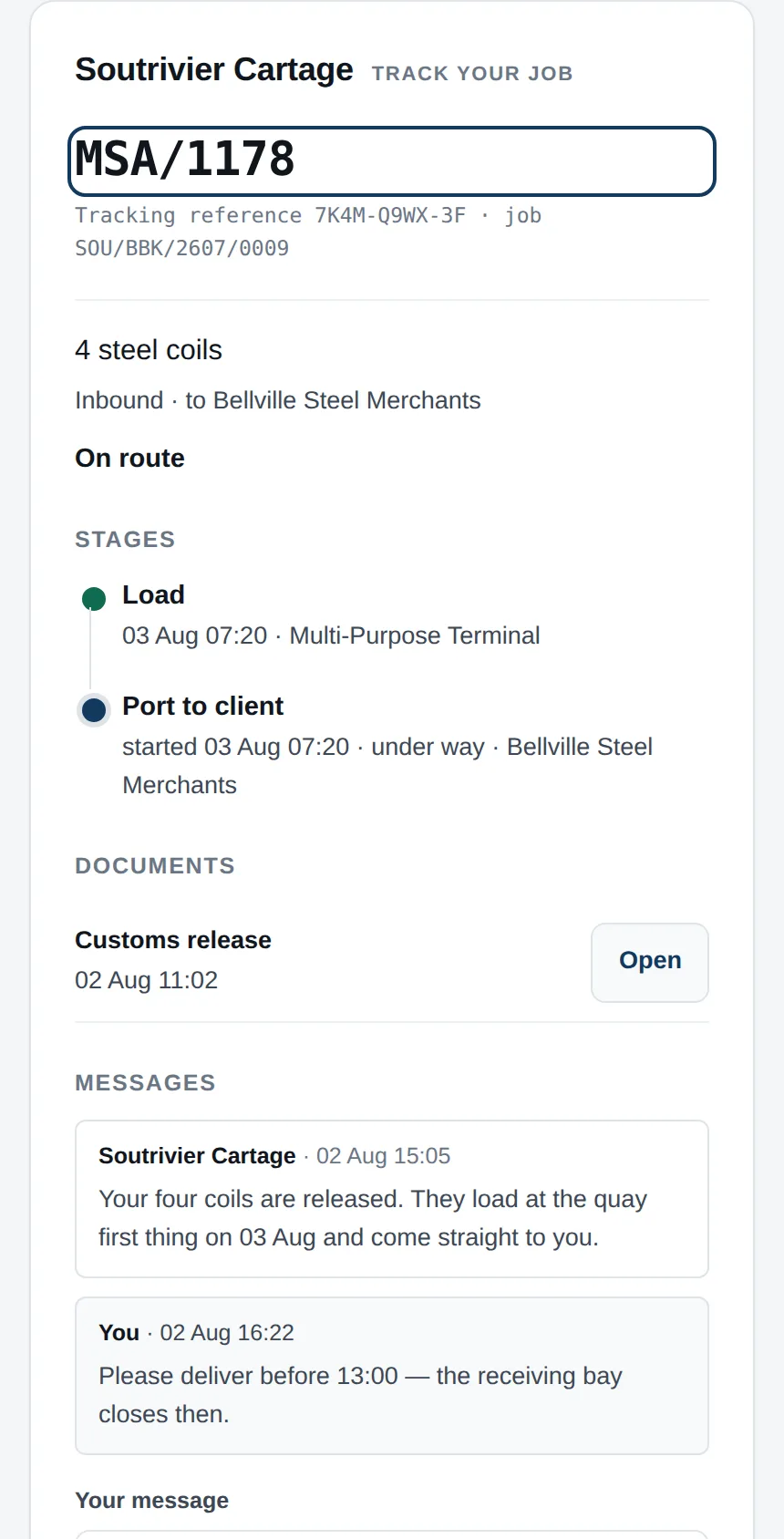
What a client sees on their phone from a tracking link: the transporter's name, the client's own reference and a tracking reference, the goods and where they are going, the status On route, the stages — loaded at the terminal, port to client under way — the customs release, and messages between the client and the transporter. Prototype screen showing invented data.

ESigning in and help

Signing in, and a welcome each time

Your company’s short name, then Google or your e-mail and password. Each time you sign in, Cobren greets you by name and says in one line what is waiting for you — the jobs that need you, what is due today and tomorrow, the port updates to decide, and the money at risk if you may see money — then opens on the screen your work starts from: the Overview for the owner, Pre-Invoicing for the invoicing clerk, the Board for everyone else. Built in the application and tested; not live yet.

Help, and AI that saves typing

Cobren reads a page you choose — a bill of lading, an arrival notification, your client’s instruction, a customs release — into the job’s fields, each beside the words on the page it came from. The depot and the last free day always wait for your tick, and nothing is saved until a person saves it. Only that page goes to Google’s AI in the EU, and your company can switch reading off. Ask Cobren, in the top bar, finds the answer in help written by people; it never reads your jobs, and when nothing answers it opens an e-mail to Cobren support with your question. Built in the application and tested against a stand-in model; not live yet, and Google’s model has not read a page — its first test on real papers runs on staging.

03 · Where we are

Where we actually are

A prototype is a design. Here is the line between what is written and tested, what is being built now, and what is only drawn.

Written and tested

  • The office’s side of the real application is written and tested. Sign in, the Overview, the board, opening a job, its stages and history, putting a truck and driver on a stage, recording, correcting or taking back what happened, Port Updates, a job’s papers, rate cards, the price and its approval, Pre-Invoicing, credit notes and load confirmations — tested against a real database and in a browser. It is not deployed, and no customer has signed in.
  • The phones are written and tested. The driver’s page, which a subcontractor’s driver opens from the office’s link, and the controller’s and owner’s page: the day’s stops, photographs that wait for a signal, and a job started from a photograph of its paper. Tested in a browser and against a real database; not deployed.
  • Your client’s link is written and tested. The tracking link for one job, a link to ask for a job, a client’s own portal with their jobs, and a “Stop these e-mails” that only the client can undo — each person’s yes or no to e-mail and WhatsApp kept as they gave it. Not deployed, and no message has gone yet.
  • Transnet’s public port lists are read and kept. The newest list per terminal, one request at a time with a pause between, each kept as published; what a list says about your jobs waits on Port Updates for a person to accept. Tested against their real lists; not deployed, so nothing has been collected yet.
  • Each company’s records are walled off in the database itself. Every table that holds a company’s records carries its mark, and the database refuses a row to anyone signed in to another company. Tests prove the wall on a real database in every build; there is no production database yet.
  • Container numbers are checked. ISO 6346: the check digit is computed, and a mistyped number is refused.
  • The last free day and the empty depot always wait for a person. That is domain code, it is tested, and no setting can turn it off.
  • The model never writes to a record. It proposes and a person accepts — that refusal is domain code, and it is tested.

Being built, or not built yet

  • Google’s model has not read a page yet. Reading a page with AI and Ask Cobren are written and tested against a stand-in model; the real model’s test on real papers is the first thing staging runs. The part that makes it safe — the date and the depot always wait for a person — is built.
  • Not built yet: managing your people and roles, the daily update e-mail, Plan the Day, and the driver and transporter summaries. Their screens are in the prototype; the real application does not have them yet.
  • No system is deployed. There is no production database and no customer data in any running system — the only real documents we hold are the port notices you have sent us yourselves, and some of Transnet’s public lists.
  • No message has gone to a client. No e-mail or WhatsApp service is connected yet, and no client has signed in.
  • Nothing is integrated with any shipping line. It will be one form your instructing agent or the delivery site fills in — no line has to integrate anything.
  • No gate reader, tag or camera. RFID is a later door, researched and not bought. The design leaves room for a camera reading container numbers at your own yard gate, each read a proposal a person accepts.
  • Abnormal loads, break bulk & LCL and airfreight are drawn, not built. The board has a lane for each; nothing yet reads a permit or an air waybill, and nothing treats loose cargo differently from a container.

04 · Security and POPIA

Security, POPIA and your data

Where your records will live, who can see them, and how long they are kept — then what this website does with you, which is nothing.

Your company’s data, once Cobren runs.

It will be kept in Google’s Johannesburg region (africa-south1); nothing runs there yet. Under POPIA your company is the Responsible Party and Cobren is the Operator, working only on your instructions. Reading a page with AI is the one step that will leave the country, because Google offers no AI model in Johannesburg: only that page goes, and you can switch reading off. You get the list of every company that handles your data before you send us your first document.

Walled off from every other company.

Every record carries your company’s mark, and the database itself refuses it to anyone signed in to another company — not only the screens. Tests prove the wall on a real database in every build.

Kept five years, then the names blanked.

A job’s record is kept five years after its last invoice, by default. Then the personal details on it are blanked — the record of what happened stays, and the blanking is recorded too.

Every change has a name on it.

Who recorded what, and when, is kept. A mistake is corrected or taken back, never rubbed out, and the history shows both.

Your client sees only what you show.

A tracking link shows one job; the portal shows a client’s own jobs and the papers you released. Neither ever shows a price, a driver, a truck or another company.

This website

No forms, no analytics, no tracking.

There is no form on this site, no analytics script, no advertising pixel and no cookie. Nothing you do here is recorded by us — the host sees the request, as any host does, and we never look at it.

Everything comes from this site.

The typefaces, the pictures and the page itself are served from cobren.io. Your browser asks no other company for anything while you read it — the page’s security policy forbids it to.

Light or dark stays with you.

If you switch the theme, that choice is kept in your own browser's local storage. It is never sent anywhere and we cannot read it.

If you email us.

Mail to janno@cobren.io is kept in Cobren's Google Workspace mailbox, so Google handles your message. We keep what you send us for as long as we are talking, and delete it within twelve months of the last message unless you have become a customer and it belongs to the file.

Cobren is a sole trader registered in the Netherlands, and Janno Mostert is the person responsible for it. This page is served by Cloudflare, which sees your IP address the way any host sees it; nothing else about your visit is recorded, and we receive none of it. To ask what we hold about you, or to have it deleted, email janno@cobren.io. We will answer within 30 days, which is the period the GDPR allows. Last updated 5 October 2026.

05 · Pricing

What it costs

R3 000 a month for the platform, plus from R500 per truck per month.

Prices exclude VAT. Cobren is being built now — not live yet; this is the price when it goes live.

A truck counts when it does a job that month.

A truck counts in a month when it does at least one job in Cobren that month. A parked truck costs nothing.

Unlimited users and unlimited containers.

Give everyone in your office a login and move as many containers as you like. Neither changes the price.

Integrations are quoted.

A link to your accounting system or a tracking feed is quoted for you, on top. That is why the truck price is “from”.

Everything else is in it.

One product, nothing to upgrade to. Reading pages with AI, once it is live, is in the same fee: no credits and no meter.

Ten trucks that each did a job this month: R3 000 + 10 × R500 = R8 000 for the month, before VAT. Tell us how many trucks you run and what you would want Cobren linked to, and we’ll send you your price in writing.

06 · Talk to us

Talk to us

We are looking for a small number of South African container transporters to build this with. If that is you, the fastest thing is a conversation.

  1. Send the demo e-mail. It asks four things: your company, your trucks, Durban, Cape Town or elsewhere, and the containers you moved last month.
  2. Twelve minutes with Janno Mostert, who is building Cobren — on invented data, with your own kind of jobs in mind.
  3. Your price, in writing. R3 000 a month, R500 for each truck that works, and a quote for anything you want Cobren linked to.
janno@cobren.io

Built for the road leg — the part of the journey that is on your truck.